Overview / Autonomy
Autonomy

Demonstrate. Train. Deploy.

Learn from demonstration. Teleoperation feeds the data; Diffusion Policy and ACT turn it into skills; the controller deploys them — stitched into long-horizon autonomy, onboard.

Diffusion PolicyACT59-DOF action labelHDF5 · one file / episodeOnboard inference
Live tool · in your browser

Curate the data in Data Curation.

A dataset-quality curation studio for MABEL imitation-learning data. It ingests recorded episodes, automatically flags the defects that poison a policy — dropped frames, out-of-sync streams, frequency drops, dead motors, missing video — grades every episode, and lets you align, blade, trim, and cull non-destructively in a Final-Cut-style timeline before exporting a clean dataset in LeRobot format. The Rerun-style 3D viewer and seven synced camera feeds are still there to review every frame.

Auto quality scoringSync + frequency detectionNon-destructive editingLeRobot export3D + 7-cam review
Architectures · live

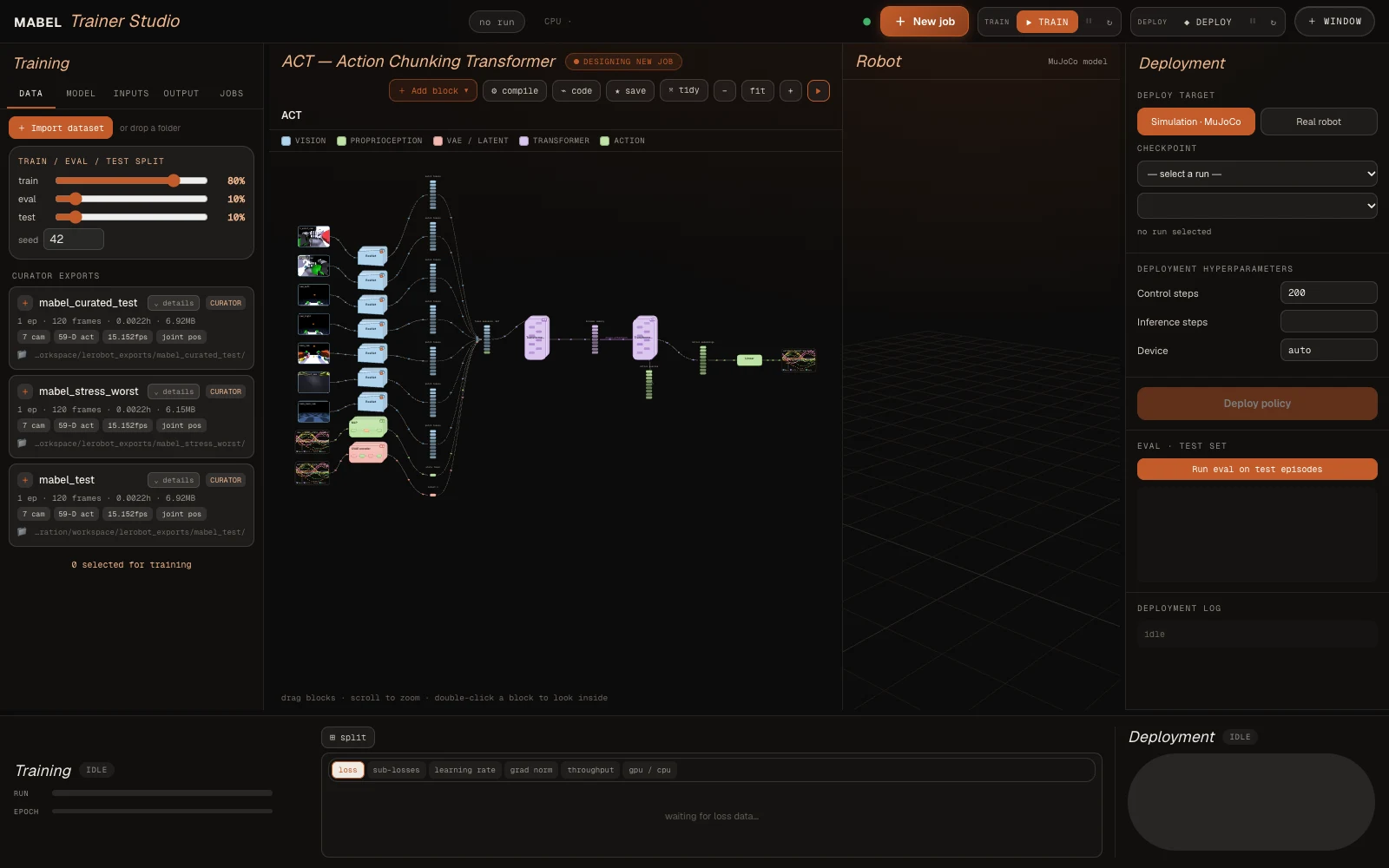
See the network. Every block.

The exact, config-accurate diagram from the Trainer Studio — the same graph the real training run compiles. Switch between ACT, the Diffusion Transformer, and π₀ / π₀.₅; drag, scroll to zoom, and double-click any block to look inside down to the individual Conv / Linear / attention atoms.

Peek at my brain!
drag · scroll to zoom · double-click a block to look inside
Community training · help train MABEL

Queue a real training job.

Pick an architecture above, choose one of MABEL’s curated datasets, tune a few hyperparameters, and submit. Your job joins the community queue; once we review it, it trains on MABEL’s GPU and the resulting policy and learning curves are published back here. No account needed — everyone can help teach the robot.

Community queue
Owner-approved before it runsRuns on MABEL’s hardwareACT · DiT · π₀ · π₀.₅Results published back

From demo to deployment.

The data engine

Teleop in, labels out.

The operator drives MABEL through the same TeleopController the live viewer and the AVP bridge use. Cut an episode with a keypress; a background thread writes it to disk while you keep working.

THE DATA ENGINE▶ every session is a dataset
01 · TELEOPdrive · sim or real
02 · RECORD15 Hz · HDF5 thread
03 · EPISODE7 cams + 59 joints
04 · TRAINACT · CVAE · Diffusion
SAME KEYS SIM ↔ REAL policies deploy with no remapping
How it records

One logger, sim or real.

A StateProvider turns whatever the platform exposes into a uniform per-frame dict; the recorder never knows whether it’s talking to MuJoCo or to hardware.

01
Shared controller

You collect through the TeleopController that already drives the sim and the bridge — so the demonstrations are generated by the exact control path a policy will later replace.

02
Uniform schema

SimStateProvider and RealStateProvider emit the same obs/action keys. Same field names in sim and on the robot is what lets a policy deploy across sim→real with no I/O remapping.

03
Non-blocking writes

EpisodeRecorder accumulates frames and saves HDF5 on a background thread — one file per episode. Numbering auto-resumes, so you can stop and restart a session without overwriting.

04
Honest about the bottleneck

Rendering seven cameras is the limit: ~15 Hz with a GPU offscreen context, ~2 Hz on a CPU-only laptop. The inspector reports the rate you actually achieved — drop cameras or resolution to hold the target.

What’s in an episode

Everything the body knows.

One HDF5 file per episode, axis 0 = frame. The actuator names, camera list, and units travel with the data in the file attrs (schema_json) and dataset_meta.json.

FieldShapeWhat
obs/cam/<name>/rgbJPEG7 cams: 2 wrist, ZED L/R, 3 body
obs/cam/<name>/depthuint16millimetres, on a subset
obs/lidar[360]planar ranges, 1° resolution
obs/joint_pos·vel·torque[59]aligned to the actuator list
obs/qpos · qvel[81]·[78]full state (sim ground truth)
obs/pose/{chassis,head,palms}[7]world position + quaternion
obs/base_twist[3]measured (vx, vy, wz)
action/ctrl[59]the label — target for every actuator
teleop/* · time/*palm targets, grasp, mode; sim & wall clock
the action label

One vector to imitate.

action/ctrl is a single 59-D target-position command for every actuator at once — arm, wrist, and finger joints, the neck, the lift, the torso, plus the base’s steer angles and drive velocities. That is the quantity a policy learns to predict. Observations describe the world; this one array is the supervision.

episode_0007.h5
├─ obs/
│   ├─ cam/{l_wrist,r_wrist,zed_left,…}/rgb
│   ├─ lidar [360]
│   └─ joint_pos|vel|torque [59]
├─ action/ctrl [59]      # ← the target-joint label
└─ attrs: schema_json, task, fps
Cut on the fly

Episodes, by keypress.

Global hot-keys (the viewer needn’t be focused) let one operator drive and segment at once — keep the good takes, discard the bad ones, never break flow.

KeyAction
SPACEstart a new episode / stop & save
Xdiscard the in-progress episode
Crecalibrate the teleop clutch at your pose
Mtoggle manipulation ↔ navigation
Btoggle lazy base-follow
Rreset to home + re-randomize the object
Q · ESCquit (auto-discards an unsaved take)
inspect · visualize · merge

A small toolbox around the files.

inspect_episode.py prints the schema, shapes, and timing — or tile-replays every camera stream. visualize_dataset.py regenerates vector-PDF diagnostics. merge_dataset.py pools several collection folders into one, renumbering episodes so sessions compose cleanly.

python collect_sim.py --name pick_cube_v1 --task "pick the blue cube"
python inspect_episode.py datasets/pick_cube_v1/episode_0000.h5 --play
python merge_dataset.py --out datasets/all datasets/pick_cube_v1 datasets/pick_cube_v2
Sim → real

Collect in sim. Deploy on hardware.

Because sim and real share the identical keys and the identical control path, a dataset gathered in MuJoCo and one gathered on the robot are the same shape — and a policy trained on either speaks the same action/ctrl the robot already executes. The learning stack picks up from here.

While navigation lands.

The base that does the driving, the controller that gates every twist, and the twin the planner is proved in first are all documented today.

Learning

What this page will hold.

01 · Data
From session to dataset

How a driven episode becomes training data — what is recorded, how it is segmented, and what gets thrown away.

02 · Train
The training recipe

Model families, the loss, and the harness that makes a run reproducible: fixed seeds, bundled statistics, auto-resume.

03 · Evaluate
Numbers, not anecdotes

Held-out evaluation and ablations under one harness, so each design choice is backed by a measurement. Published when they are real.

04 · Deploy
Onboard, no laptop

Running a checkpoint on the Jetson and handing its actions to the whole-body controller — and where that still breaks.

Already running today.

The data engine that records the episodes and the curation studio that cleans them are running today, and the policy interface is documented.